The Complete Guide to Free VPS Avenger Presets
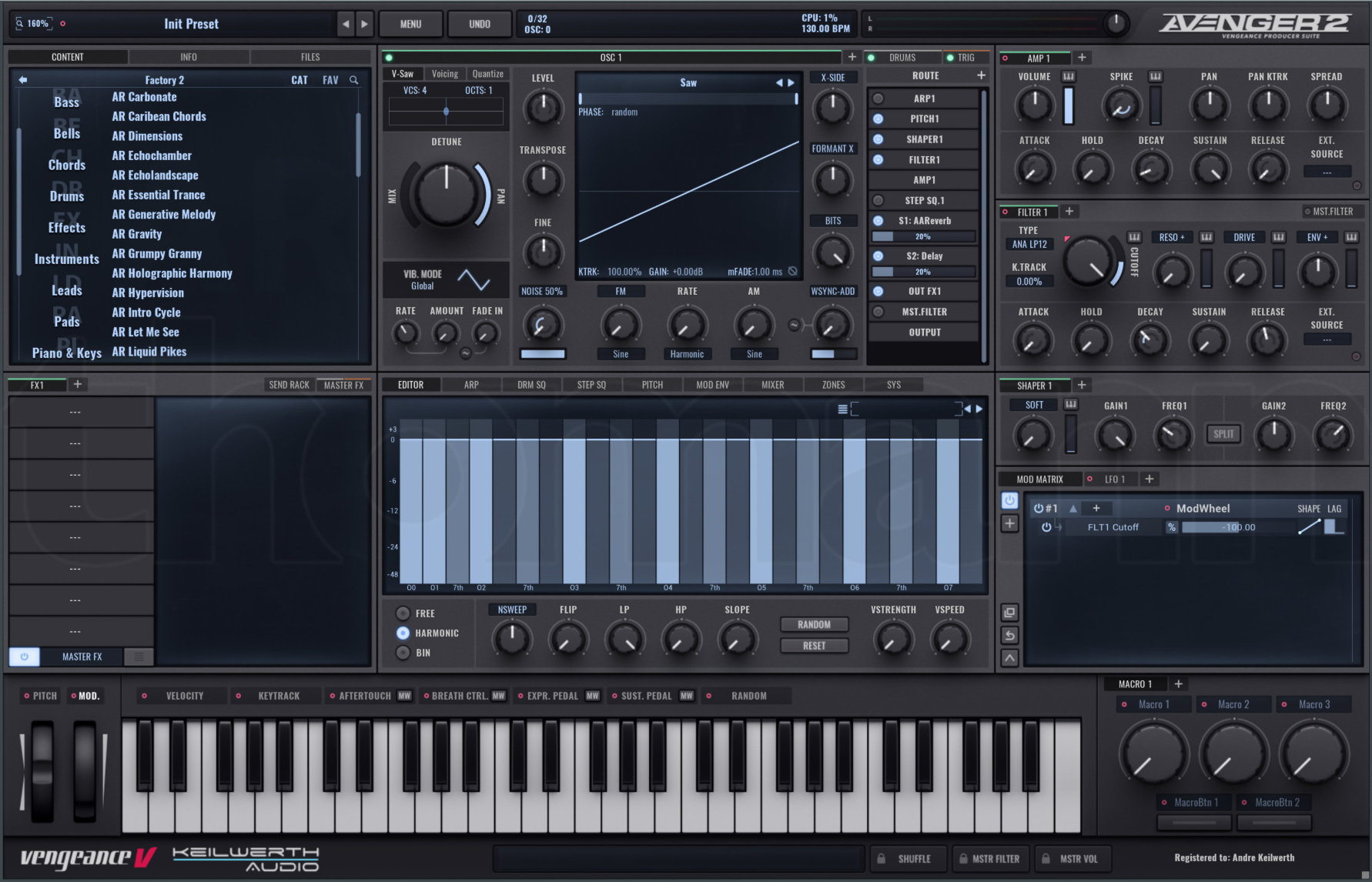
Vengeance Producer Suite (VPS) Avenger is a powerhouse synthesizer known for its massive sound library and incredible versatility. With its hybrid synthesis engine combining wavetables, samples, and traditional synthesis, Avenger has become a go-to choice for EDM, trance, and electronic music producers.
This comprehensive guide compiles every significant source of free Avenger presets available online.
Table of Contents
Major Free Preset Collections {#major-collections}
VST Warehouse - Sonic Sirius Collections (2,000+ PRESETS)
Website: https://vstwarehouse.com/sound-bank-host/avenger/
VST Warehouse hosts the largest collection of free Avenger presets through the Sonic Sirius series:
Sonic Sirius Vol. 1 (1,000 presets)
Content: 1,000 professional presets
Genres: EDM, Trance, Psytrance, Progressive
Quality: Production-ready
100% FREE
Sonic Sirius Vol. 2 (1,000 presets)
Content: 1,000 additional presets
Focus: Expanded genre coverage
Quality: Professional sound design
100% FREE
TOTAL: 2,000 FREE PRESETS
What's Included:
Arps and sequences
Basses (multiple styles)
Leads (bright, dark, aggressive)
Pads and atmospheres
Plucks and keys
FX and impacts
Drums and percussion
Why This is Essential:
Massive quantity
Professional quality
Genre-specific organization
Regular updates
Active community
Vengeance Sound Official Freebies
Website: https://www.vengeance-sound.com/downloads.html
Manuel Schleis (Vengeance) occasionally releases free content:
Free Demo Packs:
Expansion pack demos
Factory library expansions
Promotional presets
Newsletter Bonuses:
Subscriber-exclusive freebies
Seasonal giveaways
New product promotions
LFO Store - Avenger Collections
Website: https://lfo.store/product-category/software-synths/vps-avenger/
LFO Store aggregates Avenger presets from various designers:
Free Options:
Demo downloads from commercial packs
Pay-what-you-want offerings ($0 option)
Promotional freebies
Featured Designers:
Multiple professional sound designers
Genre-specific collections
Sample audio previews
ADSR Sounds - Free Avenger Presets
Website: https://www.adsrsounds.com/synth/avenger-presets/
Content: Mix of free and premium presets Free Access:
Newsletter signup rewards
Free ADSR account bonuses
Demo presets from commercial packs
Features:
Professional quality
Audio previews
Genre organized
PresetPatch - Avenger Collection
Website: https://www.presetpatch.com/vst/vengeance-avenger
Content: Community-uploaded Avenger patches Features:
Free patches
Sound design articles
Installation guides
User ratings
KVR Audio Forum - Avenger Banks
Website: https://www.kvraudio.com/forum/
Search Strategy:
Use search: "Avenger free" or "VPS Avenger"
Check Preset Sharing forum
Look for Pay-What-You-Want posts
Notable Finds:
Individual user banks
Genre-specific collections
Experimental soundsets
New Loops - Avenger Demo Presets
Website: https://newloops.com/collections/avenger-presets
Content: Demo presets from commercial packs Available Demos:
Various soundbank samples
5-10 presets per demo
Professional quality
Try Before Buy:
Commercial pack previews
Download-before-purchase option
High-quality examples
Cymatics - Occasional Avenger Releases
Website: https://cymatics.fm
Watch for:
Limited-time promotions
Newsletter subscriber bonuses
Seasonal giveaways
Black Friday specials
Past Releases:
Avenger preset packs
Expansion demos
Promotional bundles
Bedroom Producers Blog
Website: https://bedroomproducersblog.com/tag/vps-avenger/
Content: Curated free Avenger releases Features:
Quality-vetted selections
New release announcements
Sound designer promotions
PluginBoutique Free with Purchase
Website: https://www.pluginboutique.com/deals/show?sale_id=
Strategy:
Avenger presets sometimes included free with other purchases
Check "Free with Purchase" deals
Rewards program points
Community Resources {#community-resources}
Avenger User Forum (KVR Audio)
Website: https://www.kvraudio.com/forum/
Benefits:
Active user community
Preset sharing threads
Sound design tips
Technical support
How to Find Presets:
Search "Avenger presets"
Check "Share Your Work" sections
Look for attachment downloads
Free KVR account needed
Facebook - VPS Avenger Users Group
Search: "VPS Avenger Users" on Facebook
Benefits:
Active community
Preset sharing
Tips and tricks
Direct user support
Content:
Member-created banks
Tutorial presets
Sound design challenges
Reddit Communities
r/synthesizers
Avenger discussions
Free resource sharing
User experiences
r/edmproduction
Production-focused content
Preset recommendations
Community shares
YouTube Tutorial Presets
Notable Channels:
Avenger Official - Tutorial downloads
ADSR Music - Educational presets
Plugin Boutique - Demo content
Access:
Video descriptions
Google Drive links
Email signup often required
Installation Instructions {#installation}
Method 1: Using Avenger's Browser (Recommended)
For .avengerfxb Files (Avenger Bank Format):
Open Avenger in your DAW
Click "MAIN" at top left
Select "Import Bank"
Navigate to downloaded .avengerfxb file
Click "Open"
Bank appears in browser under "User Banks"
Method 2: Manual Installation
Windows Path:
C:\Users\[YourName]\Documents\VPS Avenger\Presets\macOS Path:
~/Documents/VPS Avenger/Presets/Steps:
Navigate to appropriate folder
Copy .avengerfxb files here
Restart Avenger or click "Refresh Banks"
Presets appear in browser
Method 3: Drag and Drop
For Bank Files:
Open Avenger
Drag .avengerfxb file onto Avenger interface
Bank imports automatically
Appears in browser immediately
Preset File Formats
Avenger uses:
.avengerfxb - Bank format (multiple presets)
.avengerfxp - Single preset format
.avengerexp - Expansion pack format
Important:
Always use official bank imports
Don't manually edit files
Keep backups of custom banks
Quick Reference {#quick-reference}
Largest Free Collections:
VST Warehouse Sonic Sirius - 2,000 presets (2 volumes)
Vengeance Official - Various free packs
Community Forums - 100+ user presets
Highest Quality:
Sonic Sirius Collections - Professional grade
Vengeance Official Demos - Commercial quality
New Loops Demos - Production-ready samples
Best Starting Point:
Sonic Sirius Vol. 1 & 2 - Massive variety (2,000 presets)
Factory Library - Study built-in presets
LFO Store Demos - Quality samples
Best for Specific Genres:
Trance: Sonic Sirius collections
Psytrance: Sonic Sirius Vol. 2
EDM: Sonic Sirius Vol. 1
Progressive: Both Sonic Sirius volumes
Bass Music: Community forum banks
Pro Tips
Organizing Presets
Recommended Structure:
User Banks/
├── Sonic Sirius Vol 1/
├── Sonic Sirius Vol 2/
├── Community/
├── My Creations/
└── Favorites/
    ├── Bass/
    ├── Leads/
    ├── Pads/
    └── FX/
Workflow Benefits:
Quick access to favorites
Clear categorization
Easy backups
Genre organization
Learning from Presets
Reverse Engineering:
Load preset you like
Study oscillator section
Check filter routing
Note modulation matrix
Examine effects chain
Recreate from scratch
Avenger-Specific Focus:
Layer combinations
Wavetable selections
Sample usage
Modulation routing
Master effects
Avenger's Strengths
Why Avenger is Powerful:
Hybrid Engine - Wavetables + samples + synthesis
Huge Library - 1000s of factory sounds
Deep Modulation - Extensive routing options
Built-in Effects - Professional quality
Drum Sequencer - Integrated rhythm section
Best Use Cases:
EDM production
Trance and Psytrance
Sound design
Complete productions
Bass music
Customizing Presets
Quick Modifications:
Adjust filter cutoff
Change oscillator mix
Modify attack/release
Tweak reverb amount
Adjust master volume
Advanced Editing:
Swap wavetables
Change sample layers
Modify modulation depths
Restructure effects chain
Create macro assignments
Save Your Edits:
Make modifications
Click preset name
Select "Save As"
Name descriptively
Choose User Banks category
Common Issues & Solutions
Issue: Can't Import Bank
Solution:
Verify .avengerfxb format
Check file isn't corrupted
Use "Import Bank" function
Don't manually copy to folders
Restart Avenger if needed
Issue: Presets Sound Different
Solution:
Check Avenger version (2.0+ recommended)
Verify sample library installed
Ensure all expansions loaded
Check DAW sample rate
Confirm effects are enabled
Issue: Missing Samples
Solution:
Install complete Avenger library
Check library paths in settings
Re-scan sample locations
Download missing expansions
Verify installation directory
Issue: High CPU Usage
Solution:
Reduce voice count
Disable unused oscillators
Lower filter oversampling
Freeze tracks when possible
Adjust buffer size
Avenger Features Overview
Oscillators:
8 oscillator slots
Wavetable synthesis
Sample playback
Virtual analog
FM synthesis
Multiple sync modes
Filters:
Multiple filter types
Serial or parallel routing
Drive and saturation
Envelope followers
Self-oscillation
Modulation:
8 envelopes
4 LFOs
Step sequencer
Extensive modulation matrix
Drag-and-drop modulation
Effects:
Reverb
Delay
Chorus/Flanger
Phaser
Distortion
EQ
Compressor
And more...
Drums:
Integrated drum sequencer
Sample-based drums
Synthesis drums
Pattern sequencer
Full mixing
Advanced Tips
Performance Optimization:
Limit oscillator count
Use mono mode for bass
Disable unused effects
Reduce voice count
Freeze/bounce tracks
Sound Design Workflow:
Start with similar preset
Modify one parameter at time
Use A/B comparison
Save intermediate versions
Build preset library
Live Performance:
Assign macros to controllers
Use MPE if available
Set up performance patches
Create variations
Use morph function
Version History & Compatibility
Current Version: VPS Avenger 2.x (as of 2024)
Version Notes:
Avenger 2.0 major update (2023)
Improved browser
New synthesis modes
Enhanced modulation
Preset Compatibility:
Most 1.x presets work in 2.x
Some features require 2.x
Always keep updated
Avenger vs. Other Synths
Avenger vs. Serum:
Avenger: More comprehensive, includes drums, larger factory library
Serum: Focused wavetable, cleaner interface, more CPU efficient
Avenger vs. Massive X:
Avenger: Hybrid approach, samples + synthesis, drum sequencer
Massive X: Pure synthesis, specific NI workflow
When to Use Avenger:
Need complete production tool
Want huge preset library
Hybrid synthesis approach
Integrated drums needed
Maximum flexibility required
Factory Library Highlights
Avenger's Factory Presets Worth Studying:
Basses:
"Sub Destroyer"
"Reese Master"
"FM Bass Heavy"
Leads:
"Supersaw Lead"
"Trance Lead Classic"
"Aggressive Pluck"
Pads:
"Analog Strings"
"Warm Pad Evolve"
"Ambient Space"
FX:
"Riser Build"
"Impact Hit"
"Downlifter"
Building Your Library
Strategic Approach:
Phase 1: Collect
Download Sonic Sirius Vol. 1 & 2 (2,000 presets)
Get Vengeance official freebies
Explore community banks
Phase 2: Organize
Sort by type and genre
Create favorites folder
Tag important presets
Document best sounds
Phase 3: Customize
Modify presets to taste
Create variations
Build personal style
Save as new banks
Phase 4: Create
Design original presets
Combine techniques learned
Develop signature sounds
Share with community
Expansion Packs
Official Vengeance Expansions:
Melodic House & Techno
Trance Euphoria
Progressive House
Big Room EDM
Many others...
Third-Party Expansions:
Various sound designers
LFO Store offerings
PluginBoutique exclusives
Free Demos:
Most expansions have demos
Try before buying
Usually 10-20 presets
Conclusion
VPS Avenger is an incredibly powerful synthesizer that serves as a complete production powerhouse. The free preset ecosystem is exceptional, anchored by the massive Sonic Sirius collections offering 2,000 professional presets absolutely free.
Getting Started:
Download Sonic Sirius Vol. 1 & 2 (2,000 presets) - START HERE
Get Vengeance official freebies
Explore community forums
Try expansion demos
With over 2,000+ high-quality free presets available, you have more than enough sounds to produce professional tracks without purchasing additional libraries. The Sonic Sirius collections alone rival many commercial preset packages in both quantity and quality.
Best Practices:
Study factory library first
Organize downloads systematically
Learn by reverse-engineering
Customize to your style
Share discoveries with community
Avenger's hybrid synthesis approach, combining wavetables, samples, and traditional synthesis with an integrated drum machine, makes it one of the most comprehensive soft synths available. The free presets showcase this versatility across every genre of electronic music.