The Complete Guide to Free u-he Diva Presets
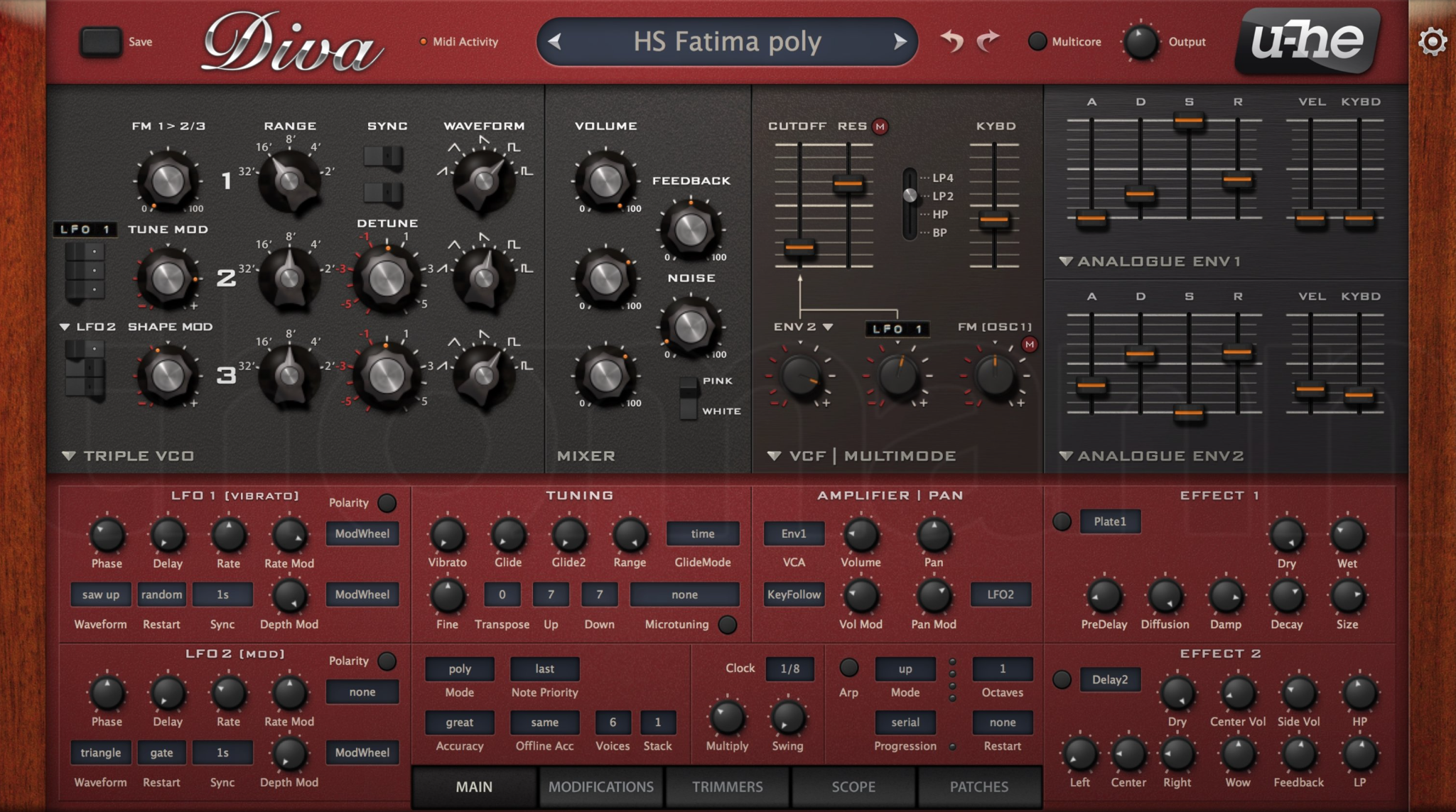
u-he Diva is widely regarded as one of the best virtual analog synthesizers available, meticulously modeling classic analog synths like the Minimoog, Roland Juno, and Prophet 5. Its authentic analog sound and CPU-intensive algorithms make it a favorite among producers who demand the warmth and character of vintage hardware.
This comprehensive guide compiles every significant source of free Diva presets available online.
Table of Contents
Major Free Preset Collections {#major-collections}
ZaBong's Diva Collections - THE ESSENTIAL FREE PACKS
Website: https://zabong.com/u-he-diva-presets
ZaBong is the undisputed king of free Diva presets, offering multiple professional-quality soundbanks:
Diva Soundbank Vol. 1
Content: 128 presets
Focus: Analog classics and vintage sounds
Quality: Professional sound design
100% FREE
Diva Soundbank Vol. 2
Content: 128 presets
Focus: Modern electronic and vintage hybrid sounds
Quality: Production-ready
100% FREE
Diva Soundbank Vol. 3
Content: 128 presets
Focus: Advanced synthesis techniques
Quality: Professional grade
100% FREE
Diva Soundbank Vol. 4
Content: 128 presets
Focus: Contemporary sounds and textures
Quality: Industry professional
100% FREE
TOTAL FROM ZABONG: 512 professional presets
Why ZaBong is Essential:
Created by experienced sound designer
Each preset is carefully crafted
Covers wide range of genres and styles
Completely free with no strings attached
Compatible with all Diva versions
Better Beats Blog - Ultimate List
Website: https://www.betterbeatsblog.com/post/the-ultimate-list-of-free-u-he-diva-presets
Better Beats Blog maintains a comprehensive compilation of free Diva resources:
Featured Collections:
Dream Waves by DCAM (64 presets)
Ambient and cinematic sounds
Atmospheric textures
Email signup required
Classic Waves by DCAM (64 presets)
Vintage analog emulations
Classic synth sounds
Email signup required
Diva Essentials by Noizefield (25 presets)
Core essential sounds
Multi-genre applicability
Free registration required
Other Collections Listed:
Various community contributions
Sound designer freebies
Demo packs from commercial releases
U-he Forum Community Patches
Website: https://u-he.com/community/patches/
The official u-he community forum is a treasure trove of user-created presets.
Features:
Active community of sound designers
Regular uploads of new presets
User ratings and comments
Free u-he forum account required
Searchable by synth and category
Categories Available:
Bass
Lead
Pad
Keys
FX
Sequence
And more
Quality: Varies from beginner to professional
Bedroom Producers Blog - Free Diva Presets Compilation
Website: https://bedroomproducersblog.com/tag/u-he-diva/
Bedroom Producers Blog regularly features free Diva preset releases.
Historical Free Releases:
Hypnotic Diva (120 presets) - Trance/Progressive
Various seasonal freebies
Sound designer promotional packs
Features:
Curated quality selections
Genre-specific packs
Regular updates with new releases
KVR Audio Forum - Diva Banks
Website: https://www.kvraudio.com/forum/viewforum.php?f=31
KVR's Preset Sharing Forum includes dedicated Diva section.
Notable Free Banks:
Diva-Licious Collection
Community favorite
Multiple genres covered
Pay-what-you-want (free option)
Various User Banks
Individual preset creators
Experimental sounds
Vintage recreations
Search Tips: Use forum search for "Diva free" or "Diva bank"
ADSR Sounds - Free Diva Presets
Website: https://www.adsrsounds.com/synth/diva-presets/
Content: Mix of free and premium presets Free Options:
Newsletter signup rewards
Promotional freebies
Demo presets from paid packs
Features:
Professional quality
Genre-organized
Free ADSR account gives access to freebies
PresetPatch - Diva Collection
Website: https://www.presetpatch.com/vst/u-he-diva
Content: Community-uploaded Diva presets Features:
Free patches
User ratings
Sound design articles
Installation guides
Cymatics - Analog Diva (Limited Time Offers)
Website: https://cymatics.fm
Note: Cymatics occasionally offers Diva preset packs during promotions Historical Releases:
Analog Diva collection
Seasonal freebies
Recommendation: Subscribe to newsletter for notifications
New Loops - Free Diva Demos
Website: https://newloops.com/collections/diva-presets
Content: Demo presets from commercial packs Available Demos:
Ambient Diva Demo
Vintage Keys Demo
Analog Leads Demo
Features:
Try before you buy
Professional quality samples
5-10 presets per demo pack
Vicious Antelope - Diva Freebies
Website: https://www.viciousantelope.com
Vicious Antelope occasionally releases free Diva presets:
Past Free Releases:
Dark Ambient Diva (10 presets)
Cinematic Textures (15 presets)
Focus: Cinematic and dark ambient sounds Quality: Professional sound design
Community Resources {#community-resources}
U-he Diva User Forum
Website: https://u-he.com/community/
Features:
Active community support
Preset sharing threads
Sound design tutorials
Official developer participation
How to Access:
Create free u-he account
Navigate to Diva section
Browse "User Patches" category
Download directly from posts
Reddit - r/synthrecipes and r/synthesizers
Subreddits:
r/synthrecipes - Sound design tutorials often include Diva presets
r/synthesizers - Community shares free resources
Search Tips:
Search "Diva presets free"
Check sidebar resources
Look for "freebie" flaired posts
YouTube Sound Designers
Many YouTube creators offer free Diva presets with their tutorials:
Notable Channels:
On Cloud Sine - Tutorial presets
Venus Theory - Occasional freebies
In The Mix - Educational presets
ADSR Music - Free tutorial downloads
How to Find:
Check video descriptions for download links
Often requires email signup
Quality varies but usually educational
Installation Instructions {#installation}
Method 1: Preset Browser (Recommended)
For .h2p Files (Diva Preset Format):
Open Diva in your DAW
Click the preset browser at the top
Click "Show Diva Presets Folder" button
This opens:
Documents/u-he/Diva/Presets/Create a "User Banks" subfolder if it doesn't exist
Copy your downloaded .h2p files here
Click "Rescan" in Diva's preset browser
Presets will appear in the browser
Method 2: Manual Installation
Windows:
C:\Users\[YourName]\Documents\u-he\Diva.data\Presets\User Banks\macOS:
~/Documents/u-he/Diva.data/Presets/User Banks/Steps:
Navigate to the folder above
Create subfolders for organization (optional)
Copy preset files (.h2p) to this location
Restart Diva or click "Rescan" in preset browser
Method 3: Drag and Drop
For Individual Presets:
Open Diva
Drag .h2p file directly onto Diva's interface
Preset loads immediately
Save to User Banks for permanent access
Preset File Formats
Diva uses .h2p file format
Important Notes:
Older presets may use .fxp format (still compatible)
Banks may be packaged as .zip files (extract first)
Some downloads include .nks files for Native Kontrol Standard (optional)
Quick Reference {#quick-reference}
Largest Free Collections:
ZaBong - 512 presets (4 volumes × 128 presets)
U-he Community Forum - Hundreds of user presets
Better Beats Blog Compilation - Multiple packs aggregated
DCAM Collections - 128 presets (2 banks)
Highest Quality:
ZaBong Volumes 1-4 - Professional grade
DCAM Dream Waves - Cinematic quality
New Loops Demos - Commercial pack samples
Vicious Antelope - Specialized dark ambient
Best for Beginners:
Noizefield Diva Essentials - 25 core sounds
ZaBong Vol. 1 - Classic analog sounds
U-he Forum Beginner Packs - Educational presets
Best for Specific Genres:
Ambient/Cinematic: DCAM Dream Waves, Vicious Antelope
Vintage Analog: ZaBong Vol. 1-2, DCAM Classic Waves
Modern Electronic: ZaBong Vol. 3-4
Trance/Progressive: Hypnotic Diva (Bedroom Producers Blog)
Pro Tips
Organizing Your Preset Library:
Create a Folder Structure:
User Banks/
├── Bass/
├── Leads/
├── Pads/
├── Keys/
├── FX/
├── ZaBong/
│   ├── Vol 1/
│   ├── Vol 2/
│   ├── Vol 3/
│   └── Vol 4/
└── Community/
Benefits:
Faster workflow
Easy to find sounds
Clear organization
Preserves original banks
Learning from Presets:
Reverse Engineering:
Load a preset you like
Open Diva's edit panel
Study the oscillator settings
Note filter configurations
Examine modulation routing
Recreate from scratch to learn
Focus Areas:
Which Diva module is used (DCO, VCO, Dual VCO, etc.)
Filter types and cutoff settings
Envelope shapes
LFO assignments
Effects chain
Optimizing CPU Usage:
Diva is CPU-intensive due to its accurate analog modeling.
Tips:
Use "Draft" quality while composing
Switch to "Divine" for final mixdown
Freeze/bounce tracks when not editing
Limit polyphony when possible
Use "Eco" mode for less critical parts
Creating Your Own Presets:
Start with Factory Presets:
Load a similar factory preset
Modify to taste
Save as new user preset
Build your personal library
Save Format:
Use descriptive names
Include genre or use case
Add initials for personal presets
Example: "JD_Bass_Reese_Dark"
Diva Modules Explained
Understanding Diva's modules helps you appreciate preset design:
Oscillator Modules:
Triple VCO - Based on Minimoog (fat bass, leads)
Dual VCO - Based on Jupiter 8 (lush pads, strings)
DCO - Based on Juno 60 (bright, digital-analog hybrid)
Dual VCO Eco - CPU-friendly version
Digital - Based on various digital synths
Filter Modules:
Cascade - Minimoog ladder filter
Bite - MS-20 aggressive filter
Uhbie - Custom u-he design
Digi - Digital precision
Ladder - Classic Moog style
And more...
Preset Tip: Check which modules a preset uses to understand its character
Common Issues & Solutions
Issue: Presets Don't Appear After Installation
Solution:
Verify files are .h2p format
Check correct folder location
Click "Rescan" in Diva browser
Restart DAW if necessary
Issue: Preset Sounds Different Than Demo
Solution:
Check Diva quality setting (Draft vs Divine)
Verify correct Diva version
Ensure all effects are enabled
Check DAW sample rate settings
Issue: High CPU Usage
Solution:
Lower quality setting
Reduce polyphony
Use "Eco" oscillators when possible
Freeze tracks
Disable unused effects
Version Compatibility
Diva Versions:
Current: Diva 1.4.8 (as of 2024)
Most presets compatible with 1.4.0+
Very old presets may need minor tweaking
Backwards Compatibility:
Newer presets work in older Diva versions
Some advanced features may not be available in old versions
Factory library updates recommended
What Makes Diva Special?
Authentic Analog Sound:
True analog modeling (not samples)
Component-level circuit modeling
Realistic drift and imperfections
Warmth and character of hardware
Flexibility:
Mix and match modules
Multiple classic synth models in one
Deep modulation matrix
Extensive effects section
Sound Quality:
Industry-standard for virtual analog
Used by professional producers worldwide
Comparable to hardware synthesizers
Conclusion
u-he Diva stands as one of the finest virtual analog synthesizers available, and the free preset ecosystem is remarkably rich thanks to generous sound designers like ZaBong and the active u-he community.
Getting Started:
Download all 4 ZaBong volumes (512 presets) - START HERE
Grab DCAM collections (128 presets)
Explore u-he forum for community gems
Try New Loops demos for professional sounds
With over 700+ professional-quality free presets available, you have access to an incredible range of vintage and modern sounds without spending a dime. ZaBong's contribution alone (512 presets) rivals many commercial libraries in both quantity and quality.
Diva's CPU demands are worth it for the authentic analog sound. Use the free presets as both inspiration and education - reverse-engineer them to learn analog synthesis principles that apply to hardware and software alike.