
The Complete Guide to Free u-he Hive Presets
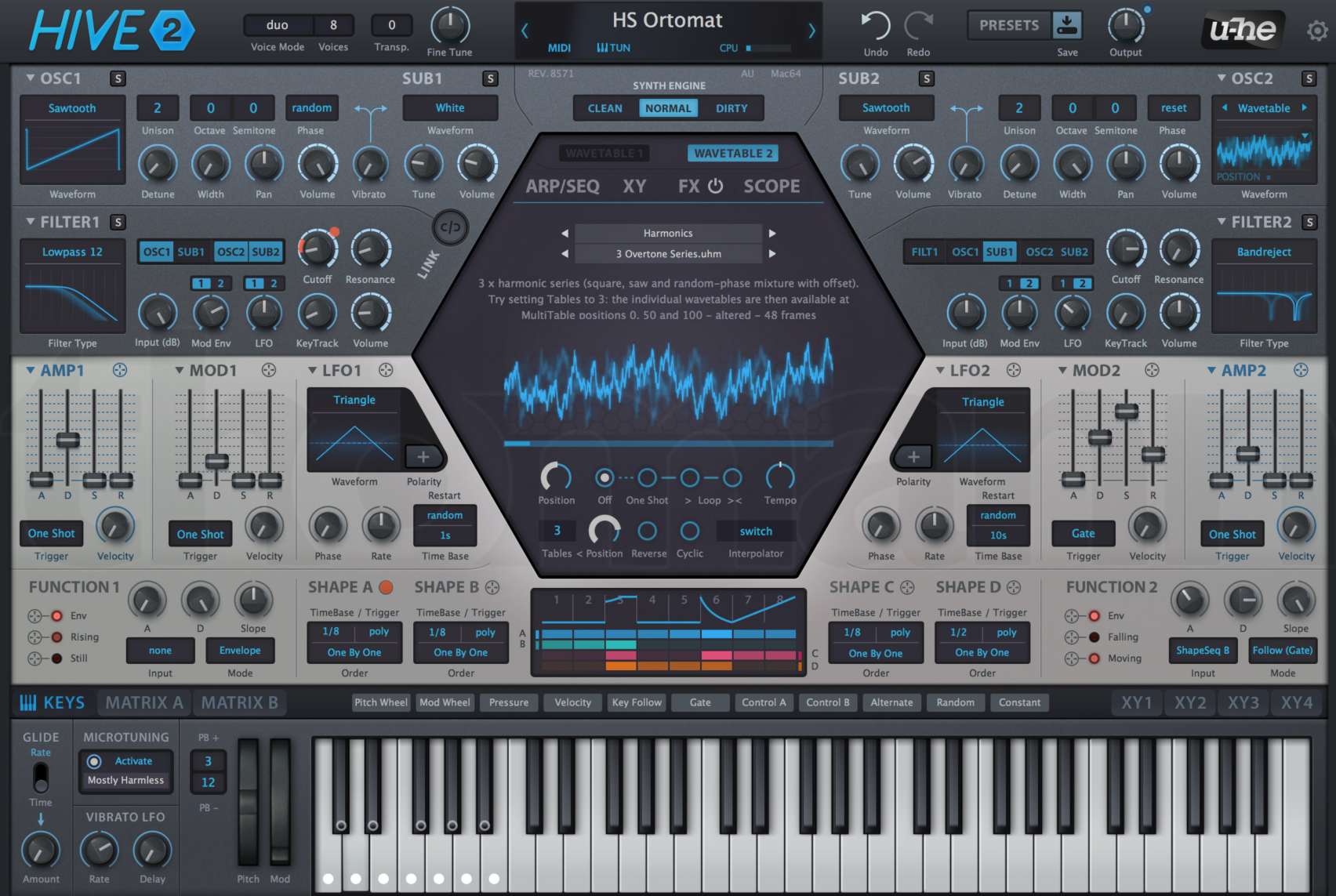
u-he Hive is a streamlined, CPU-efficient synthesizer that punches well above its weight class. Designed as an accessible yet powerful synth, Hive delivers professional sounds without the CPU overhead of Diva. It's perfect for producers who need great sounds quickly without sacrificing computer resources.
This comprehensive guide compiles every significant source of free Hive presets available online.
Table of Contents
Major Free Preset Collections {#major-collections}
Gearspace Community Collection - 310+ Presets (LARGEST FREE PACK)
The Gearspace (formerly Gearslutz) community has created the most comprehensive free Hive preset collection available.
Content: 310+ user-contributed presets Quality: Ranges from beginner to professional Genres: All styles covered Format: .h2p (Hive preset format)
What's Included:
Bass presets (various styles)
Lead synths
Pad sounds
Keys and organs
Plucks and mallets
FX and atmospheres
Sequences and arpeggios
Why This Collection is Essential:
Community-vetted sounds
Diverse range of contributors
Active thread with new additions
Free Gearspace account required to download
Multiple pages of presets to explore
How to Access:
Create free Gearspace account
Navigate to thread linked above
Browse through pages for download links
Multiple community members have posted banks
Download attachments directly from posts
ZaBong's Hive Collection
Website: https://zabong.com/u-he-hive-presets
ZaBong, known for exceptional Diva presets, also creates quality Hive sounds:
Hive Soundbank Vol. 1
Content: 128 presets
Focus: Modern electronic and classic analog emulations
Quality: Professional sound design
Price: Check website (occasionally free)
Features:
Carefully crafted sounds
Production-ready presets
Wide genre coverage
Mod wheel assignments
Macro knob programming
U-he Forum Community Patches
Website: https://u-he.com/community/patches/
The official u-he community forum includes dedicated Hive section:
Features:
Active community uploads
User ratings and comments
Searchable database
Free u-he forum account required
Regular new additions
Categories:
Bass
Lead
Pad
Keys
FX
Pluck
Sequence
Quality: Community-contributed (varies)
ADSR Sounds - Free Hive Presets
Website: https://www.adsrsounds.com/synth/hive-presets/
Content: Mix of free and premium Hive presets Free Access:
Newsletter signup rewards
Promotional freebies
Demo presets from commercial packs
Features:
Professional quality
Genre-specific collections
Free ADSR account required
Sample audio previews
PresetPatch - Hive Collection
Website: https://www.presetpatch.com/vst/u-he-hive
Content: Community-uploaded Hive patches Features:
Free patches available
Sound design articles
Installation guides
User ratings
KVR Audio Forum - Hive Banks
Website: https://www.kvraudio.com/forum/viewforum.php?f=31
KVR's Preset Sharing Forum includes Hive presets:
Search Strategy:
Use forum search: "Hive free" or "Hive bank"
Check "Free Stuff" announcements
Look for "Pay What You Want" (PWYW) offerings
Notable Banks:
Individual user contributions
Genre-specific collections
Pay-what-you-want with $0 option
Bedroom Producers Blog
Website: https://bedroomproducersblog.com/tag/u-he-hive/
Content: Occasional free Hive preset releases Features:
Curated quality selections
Promotional pack announcements
Sound designer freebies
Past Releases:
Seasonal giveaways
New product promotions
Tutorial presets
New Loops - Hive Demo Presets
Website: https://newloops.com/collections/hive-presets
Content: Demo presets from commercial Hive packs Available Demos:
Various soundbank demos
5-10 presets per demo
Professional quality samples
Features:
Try before you buy
Production-ready sounds
Free to download
Cymatics - Occasional Hive Freebies
Website: https://cymatics.fm
Note: Watch for limited-time promotions Past Offers:
Hive preset collections during sales
Newsletter subscriber bonuses
Seasonal giveaways
Recommendation: Subscribe to newsletter for alerts
Community Resources {#community-resources}
U-he Hive User Forum
Website: https://u-he.com/community/
Forum Benefits:
Direct support from developers
Preset sharing threads
Sound design tips
Troubleshooting help
How to Participate:
Create free u-he account
Navigate to Hive section
Browse "User Patches" threads
Download from post attachments
Reddit Communities
r/synthrecipes
Sound design tutorials with Hive presets
Recreation attempts
Tips and techniques
r/synthesizers
General synth community
Free resource sharing
Hive discussions
Search Tips:
Search "Hive presets free"
Look for "freebie" posts
Check community resources
YouTube Tutorial Presets
Many creators offer free Hive presets with tutorials:
Notable Channels:
ADSR Music - Tutorial downloads
On Cloud Sine - Educational presets
In The Mix - Beginner-friendly sounds
Access:
Check video descriptions
Often requires email signup
Educational and usable
Installation Instructions {#installation}
Method 1: Preset Browser (Recommended)
For .h2p Files (Hive Preset Format):
Open Hive in your DAW
Click the preset name at top center
Click "Show Hive Presets Folder" button
This opens:
Documents/u-he/Hive/Presets/Create "User Banks" subfolder if needed
Copy downloaded .h2p files here
Click "Rescan" in Hive's preset browser
Presets appear in browser under "User Banks"
Method 2: Manual Installation
Windows Path:
C:\Users\[YourName]\Documents\u-he\Hive.data\Presets\User Banks\macOS Path:
~/Documents/u-he/Hive.data/Presets/User Banks/Steps:
Navigate to appropriate folder
Create organizational subfolders (optional)
Copy .h2p preset files
Restart Hive or click "Rescan"
Method 3: Drag and Drop
For Single Presets:
Open Hive
Drag .h2p file onto Hive interface
Preset loads immediately
Save to User Banks for permanent storage
Preset File Formats
Hive uses .h2p file format
Compatible Formats:
.h2p - Native Hive presets
.fxp - Older format (still works)
Banks may be .zip (extract first)
Important:
Hive 2.0+ recommended for all presets
Older versions may have compatibility issues
Quick Reference {#quick-reference}
Largest Free Collections:
Gearspace Community - 310+ presets
U-he Forum - 100+ user presets
ZaBong - 128 presets (check availability)
Highest Quality:
ZaBong Soundbank - Professional grade
New Loops Demos - Commercial quality samples
Gearspace Featured Banks - Community favorites
Best Starting Point:
Gearspace Collection - Largest variety
U-he Forum - Active community
Factory Presets - Study these first
Best for Specific Genres:
EDM/Electronic: Gearspace collection
Bass Music: U-he forum bass presets
Ambient/Cinematic: New Loops demos
General Production: ZaBong collection
Pro Tips
Organizing Presets
Recommended Folder Structure:
User Banks/
├── Bass/
│   ├── Sub Bass/
│   ├── Mid Bass/
│   └── Reese/
├── Leads/
│   ├── Plucks/
│   └── Sustained/
├── Pads/
├── Keys/
├── FX/
├── Community/
│   └── Gearspace/
└── My Presets/
Benefits:
Faster workflow
Genre-specific organization
Easy backup
Clear categorization
Learning from Presets
Reverse Engineering Process:
Load preset you like
Study oscillator waveforms
Examine filter settings
Note modulation assignments
Recreate from scratch
Focus Areas:
Oscillator detune amounts
Filter cutoff and resonance
Envelope shapes (ADSR)
LFO speeds and depths
Effects chain order
Hive's Strengths
Why Use Hive:
CPU Efficient - Low resource usage
Fast Workflow - Simple interface
Great Sound - Professional quality
Quick Results - Immediate gratification
Reliable - Stable in all DAWs
Best Use Cases:
Large projects with many instances
Live performance
Quick sketch ideas
CPU-limited systems
Beginner-friendly learning
Customizing Presets
Macro Knobs:
Hive has 4 macro knobs
Assign frequently used parameters
Create performance controls
Save as new preset
Quick Edits:
Adjust filter cutoff
Change oscillator detune
Modify reverb/delay mix
Tweak envelope attack
Save Your Edits:
Make modifications
Click preset name
Select "Save As"
Name descriptively
Choose User Banks location
Common Issues & Solutions
Issue: Can't Find Installed Presets
Solution:
Check correct folder location
Verify .h2p file format
Click "Rescan" in preset browser
Restart DAW if necessary
Check "User Banks" category
Issue: Preset Sounds Different
Solution:
Verify Hive version (2.0+ recommended)
Check DAW sample rate
Ensure effects are enabled
Compare with demo audio
Issue: Download Links Not Working
Solution:
Create free account (Gearspace, u-he forum)
Check spam folder for emails
Try different browser
Contact preset creator directly
Hive vs. Other u-he Synths
Hive vs. Diva:
Hive: CPU-efficient, modern workflow, great for multiple instances
Diva: CPU-intensive, authentic analog modeling, vintage warmth
Hive vs. Repro-1/Repro-5:
Hive: General-purpose, flexible, modern
Repro: Specific vintage emulations, CPU-heavy, authentic
When to Use Hive:
Need multiple synth instances
Want fast workflow
Limited CPU available
Modern electronic production
Quick sound design
Factory Presets Worth Studying
Hive comes with excellent factory presets:
Essential Factory Presets:
Bass: "Sub Destroyer", "Reese Business"
Leads: "Screamer", "Pluck Heaven"
Pads: "Warm Strings", "Analog Pad"
Keys: "Hollow Keys", "EP Rhodes"
Learning Value:
Study modulation routing
Note macro assignments
Understand synthesis techniques
Use as starting points
Creating Your Own Library
Building a Personal Collection:
Step 1: Gather Free Presets
Download Gearspace collection (310+)
Get u-he forum presets
Collect ZaBong sounds
Step 2: Organize
Sort by type (bass, lead, pad, etc.)
Create genre folders
Name consistently
Tag favorites
Step 3: Customize
Modify presets to taste
Save variations
Build personal style
Document favorite settings
Step 4: Backup
Regular backups of Presets folder
Cloud storage recommended
Keep original downloads
Version control for important presets
Hive Features Overview
Oscillators:
2 oscillators with various waveforms
Sub oscillator
Noise generator
FM synthesis capable
Filters:
Multimode filter
Drive/Saturation
Self-oscillation
Multiple routing options
Modulation:
2 LFOs
2 Envelopes
Modulation matrix
4 macro knobs
Effects:
Reverb
Delay
Chorus
Phaser
Built-in limiter
Advanced Tips
Performance Optimization:
Use monophonic mode for bass
Limit voices when possible
Disable unused effects
Use "Economy" mode if available
Sound Design Shortcuts:
Start with similar factory preset
Use macro knobs for variations
Copy/paste modulation assignments
Save intermediate versions
Live Performance:
Assign macros to MIDI controllers
Use velocity sensitivity
Set up mod wheel assignments
Create performance variations
Version History & Compatibility
Current Version: Hive 2.1+ (as of 2024)
Version Compatibility:
Hive 2.0+ recommended for all presets
Most presets work in Hive 1.x
Some advanced features require 2.0+
Update Recommendations:
Keep Hive updated for best compatibility
Check u-he website for updates
Factory library updates included
Conclusion
u-he Hive is an excellent synthesizer that balances power with efficiency. The free preset ecosystem, while smaller than some other synths, is anchored by the comprehensive Gearspace community collection with 310+ presets and the active u-he forum community.
Getting Started:
Download Gearspace Collection (310+ presets) - START HERE
Explore u-he forum user patches
Get ZaBong collection if available
Try New Loops demos
With over 450+ quality free presets available, you have solid foundation for any production style. Hive's efficiency means you can run multiple instances without CPU concerns, making these free presets even more valuable.
Best Practices:
Study factory presets first
Organize downloads systematically
Customize presets to your style
Build personal library over time
Share your creations with community
Hive rewards both beginners and professionals with its straightforward interface and excellent sound quality. The free preset collections provide instant inspiration while teaching synthesis principles through reverse engineering.
Last Updated: January 2026
Total Free Presets Available: 450+
Essential Download: Gearspace Collection (310+ presets)
All presets are 100% royalty-free
System Requirements:
u-he Hive 2.0 or higher recommended
VST/AU/AAX compatible DAW
Low CPU requirements (one of Hive's strengths!)
Works on modest systems
Official Website: https://u-he.com/products/hive/
Official Price: $149 (excellent value for features)